AI Agent for Sitecore XP using a Custom MCP
SitecoreAI is built for AI integrations out of the box: Marketer MCP, Agentic Studio and other AI-ready tools are built in and enable easy AI integrations instantly. If you run Sitecore XP (IaaS or on-premise), none of that is wired for you. But XP is not cut off from AI tooling: it already exposes APIs to build against, and there are existing tools to wrap those APIs for AI.
This article covers AI enablement for Sitecore XP - using an existing community MCP server, or building your own.
Find code on github.
Plan: start from a read-only agent
Connecting a complex, advanced AI agent can get abstract fast. Define these aspects first:
- Scope - what the agent can and cannot do.
- Tools - which tools are available to it.
- Knowledge - what the agent knows about the system, and which skills it has.
- Security and safety - is it safe to run? How do you guarantee no content is broken after the agent acts?
To keep it simple, let’s build an Editors Support Agent. It runs read-only queries against the codebase and the Sitecore CM instance, so an editor’s question about a misconfiguration - or about how something works - is answered by the agent instead of a developer.
Sitecore MCP
For the Sitecore side I built
sitecore-gql-mcp
(npm): a small engine that turns GraphQL queries into
MCP tools. You write a query, it becomes a tool; the engine handles authentication, transport,
and result shaping, and stays read-only by default - it refuses any query that mutates
unless you explicitly opt in.
Three tools come out of the box:
get_item- an item by path or id, with its fields and children.search- keyword search over the content index, scoped to a subtree.list_sites- the sites on the instance and their content language.
Prerequisite: turn on GraphQL
The engine wraps the GraphQL API, so first make sure GraphQL is enabled on your instance.
Useful references for the setup:
- docker-compose.yml
example using the
Sitecore_GraphQL_Enabledenvironment variable. - Start using the Sitecore GraphQL API documentation.
Note. The mcp-sitecore-server described later can also work with PowerShell Remoting and the Item Service API - pick whichever fits. GraphQL is the simplest to configure and to build custom tools against.
Adding a custom tool
To add a custom tool, drop a folder under tools/:
tools/
  get_setting_by_name/
    index.yaml      # name, description, input schema, variable mapping
    query.gql       # the GraphQL query
    transform.js    # optional: reshape the raw result for the agent
The engine scans the folders, validates each manifest, and registers the tool - no wiring code. Then run it, pointing at your tools:
# bash
SITECORE_API_KEY=xxx npx -y sitecore-gql-mcp \
  --endpoint https://cm.local/sitecore/api/graph/items/master \
  --tools ./tools
# PowerShell
$env:SITECORE_API_KEY = "xxx"
npx -y sitecore-gql-mcp `
--endpoint https://cm.local/sitecore/api/graph/items/master `
--tools ./toolsCommunity vs custom MCP server
Why build a custom server when mcp-sitecore-server
by Anton Tishchenko already exists? I see them serving different goals. mcp-sitecore-server is
better suited to developers who want to automate and speed up development work. sitecore-gql-mcp
is better suited to customizations and adaptations defined for your specific agent or context.
Community mcp-sitecore-server | Your own tools | |
|---|---|---|
| What it exposes | The API, one-to-one (100+ tools) | A handful of tools you define |
| Setup | Minutes, no code | A folder per tool (query + transform) |
| Grounding | Generic Sitecore | Your queries, your context |
| Best for | Exploration, one-off scripting, developers | A focused, scoped, repeatable assistant |
Defining Sitecore tools
For the Editors Support Agent, these make good custom tools:
get_pages_by_site- the pages under a site, with their presentation.get_setting_by_name- one settings item by site and name, with raw field values.
Each maps to how an editor thinks, not to the raw API, and returns exactly the shape the agent
needs. You can see the tool examples in
examples/tools.
Code knowledge MCP
Sitecore answers what is configured; the codebase answers why it behaves that way. So the
agent also gets a second MCP,
codebase-search-mcp
(npm): a read-only view over the solution code,
built on ripgrep. It exposes grep_content, find_files, and read_file, all locked to a
single code root - no write tools, no shell.
The code is materialized on disk at deploy (cloned from the repository), and the MCP searches it. That lets the agent ground an explanation in the actual renderings, pipelines, and config that drive the behavior - instead of guessing - while never being able to change anything.
Try it
We built and used this agent, and it works: an approach similar to Claude Code, extended with a simple, clear Sitecore MCP and a read-only code search.
A real example - an editor asks why a personalized component does not render on a page:
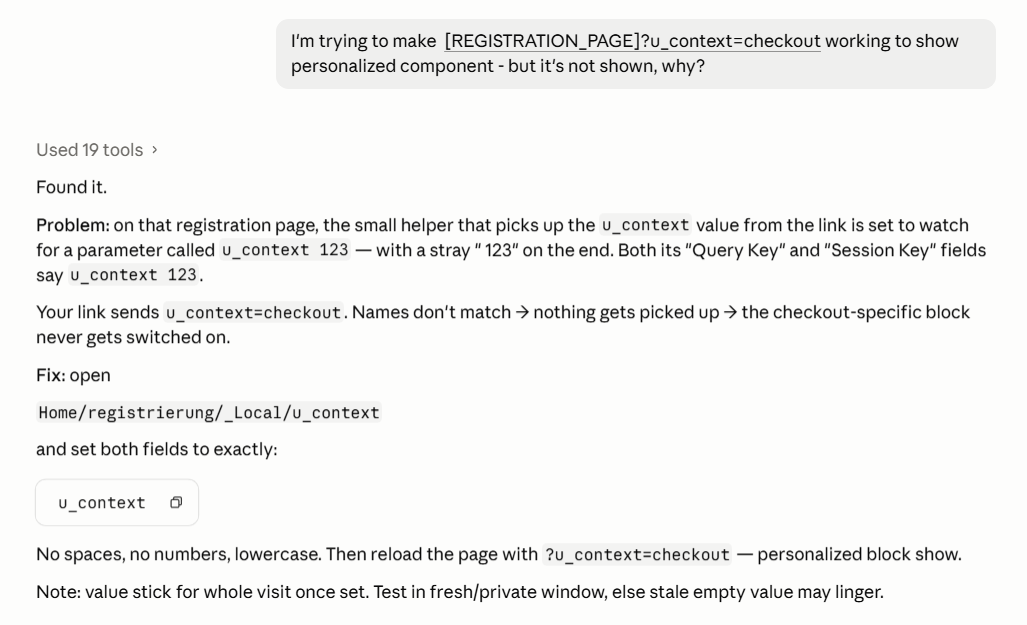
Nineteen tool calls later the agent points at the exact item and field: the u_context settings
item carries a stray 123 in its Query Key and Session Key, so the query string never matches
and the personalized block never switches on. Sitecore MCP found the setting, the code MCP
explained how it is read - no developer involved.
If you have ideas on how to improve this, or a tool you would like to see, let me know.
View article as markdown